
The feedback I’ve received most often since becoming Membership Officer is that some members feel they receive too many emails. But it doesn’t have to be this way!
Our Getting to Grips to Groups.io mini-series continues with a look at how to change your preferences to receive fewer emails.
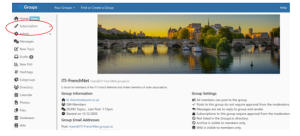
When you join groups.io, your Email Delivery defaults to individual messages, but you can change it at any time. Simply go to the e-forum platform at https://iti-frenchnet.groups.io/g/main. On the left-hand side, select “Subscription”:
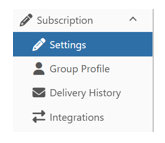
Then “Settings”:
You will then see a choice of email delivery options.
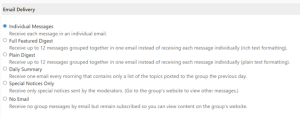
If you want to follow a thread as it’s developing, or if you want to be first to reply to a job offer, then individual messages are great.
If you prefer to receive a bundle of updates at the same time, consider the next three options above. Personally, I haven’t found much difference between the Full featured digest, the Plain digest and the Daily digest, apart from the way they look. It won’t affect anyone else if you play around with this for a few days, so see which presentation you prefer.
If don’t want to receive any emails, take a look at the last two options: Special notices only or No email. Unless there are some unforeseen circumstances, the only email that is sent as a “Special Notice” is for subscription renewals once a year, in May.
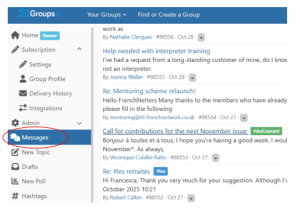
No matter which of the six options you select, you can still log into groups.io any time that suits you, to browse through recent messages. You’ll find all our emails by clicking on Messages:
Once you’ve changed your email delivery setting, don’t forget to scroll right down to the bottom of the page and click on the green “Save” button:

To make existing messages easier to browse, we’re going to try to improve our hashtag management – to find out more, look out for Getting to Grips: Part 3, in the next issue of Au Courant!